Ksama Arora
(I) DEPLOY MLFLOW MODEL TO A BATCH ENDPOINT*
Note: When you deploy Mlflow models to Batch endpoint, a Scoring Script and Environment will be automatically generated.
REGISTER AN MLFLOW MODEL:
To avoid needing scoring script and environment, Mlflow needs to be registered in Azure ML workspace before you can deploy to batch endpoint.
from azure.ai.ml.entities import Model # Model class used
from azure.ai.ml.constants import AssetTypes

# We are taking model files from local path. The files are stored in local folder called model.
model_name = 'mlflow-model' # model type as mlflow_model
model = ml_client.models.create_or_update(
    Model(name=model_name, path='./model', type=AssetTypes.MLFLOW_MODEL)
)
DEPLOY AN MLFLOW MODEL TO A BATCH ENDPOINT
Note: Advantage of using compute cluster is you can run scoring script on separate instances in parallel
- To deploy Mlflow model to a batch endpoint, use code:
from azure.ai.ml.entities import BatchDeployment, BatchRetrySettings
from azure.ai.ml.constants import BatchDeploymentOutputAction

deployment = BatchDeployment( # use BatchDeployment class
    name="forecast-mlflow",
    description="A sales forecaster",
    endpoint_name=endpoint.name,
    model=model,
    compute="aml-cluster",
    instance_count=2,
    max_concurrency_per_instance=2,
    mini_batch_size=2,
    output_action=BatchDeploymentOutputAction.APPEND_ROW,
    output_file_name="predictions.csv",
    retry_settings=BatchRetrySettings(max_retries=3, timeout=300),
    logging_level="info",
)
ml_client.batch_deployments.begin_create_or_update(deployment)
IMP NOTE:
Configuration Setting for batch deployment:
- mini_batch_size: number of records processed each time the run script is invoked
- instance_count: number of compute nodes the batch job will use
- output_action: determine how output should be treated, e.g. append_row or summary_only
- scoring_script: used to configure path of scoring_script
- max_concurrency_per_instance: Maximum number of parallel scoring script runs per compute node.
- output_file_name: File to which predictions will be appended, if you choose append_row for output_action. A batch endpoint can be configured to take as input of a file and produce as output file.
Note: For the pipeline to run scoring script on multiple nodes and collate results, use apend_row to append each prediction to one output file
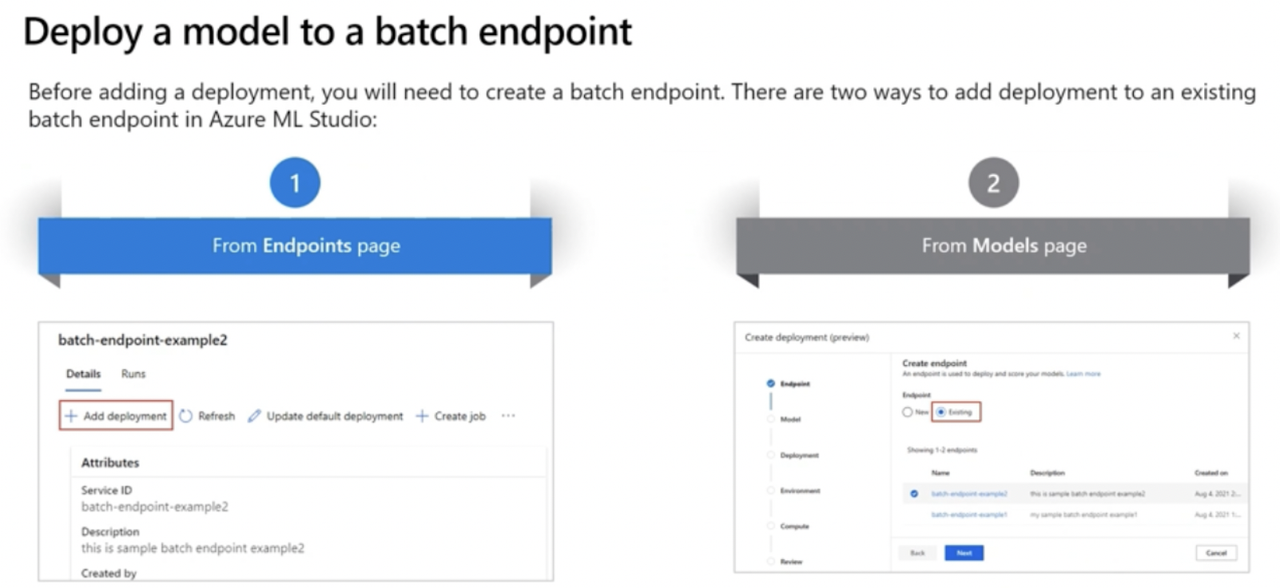
Two ways to add deployment to batch endpoint: