Ksama Arora
Creating datastore for an Azure Blob Storage container:*
- By Azure CLI
By Python SDK
Using account key:
blob_datastore = AzureBlobDatastore(
        name = "blob_example",
        description = "Datastore pointing to a blob container",
        account_name = "mytestblobstore",
        container_name = "data-container",
        credentials = AccountKeyConfiguration(
            account_key="XXXxxxXXXxXXXXxxXXX"
        ),
)
ml_client.create_or_update(blob_datastore)
Using SAS token to authenticate:
blob_datastore = AzureBlobDatastore(
        name="blob_sas_example",
        description="Datastore pointing to a blob container",
        account_name="mytestblobstore",
        container_name="data-container",
        credentials=SasTokenConfiguration(
            sas_token="?xx=XXXX-XX-XX&xx=xxxx&xxx=xxx&xx=xxxxxxxxxxx&xx=XXXX-XX-XXXXX:XX:XXX&xx=XXXX-XX-XXXXX:XX:XXX&xxx=xxxxx&xxx=XXxXXXxxxxxXXXXXXXxXxxxXXXXXxxXXXXXxXXXXxXXXxXXxXX"
        ),
)
ml_client.create_or_update(blob_datastore)
IMP Note:
AzureBlobDatastore class is used to register a new blob storage with the SDK v2. Note that the method register_azure_blob_container doesn’t belong to the SDK v2 but to the SDK v1.
Creating Data Asset and Reading Data*
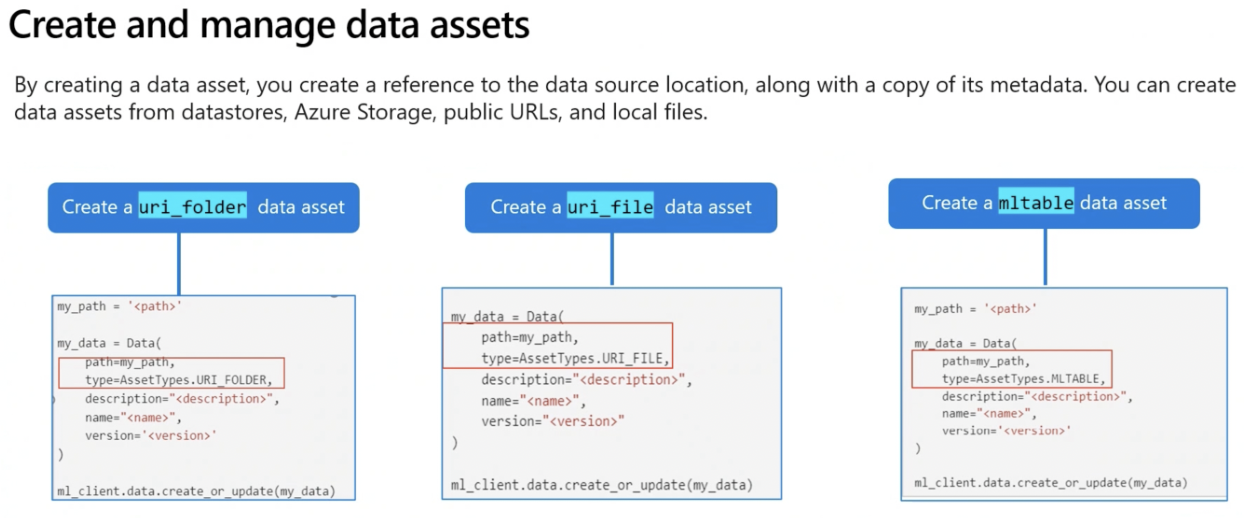
When you create a data asset in Azure Machine Learning and point to a file or folder stored on your local device, a copy of the file or folder is uploaded to the default datastore (workspaceblobstore). The uploaded data can be found in the LocalUpload` folder. This ensures that you can access the data from the Azure Machine Learning workspace, even if the original file or folder on your local device becomes unavailable.
1. URI File Data Asset
A URI file data asset points to a specific file (e.g., CSV, JSON). Azure ML only stores the path to the file, this means you can point to any type of file.
- Creating a URI File Data Asset:
from azure.ai.ml.entities import Data from azure.ai.ml.constants import AssetTypes my_path = '<supported-path>' my_data = Data( path=my_path, type=AssetTypes.URI_FILE, description="<description>", name="<name>", version="<version>" ) ml_client.data.create_or_update(my_data) - Reading the Data:
import argparse
import pandas as pd

parser = argparse.ArgumentParser()
parser.add_argument("--input_data", type=str)
args = parser.parse_args()

df = pd.read_csv(args.input_data)
print(df.head(10))
2. URI Folder Data Asset
A URI folder data asset points to a specific folder. It works similar to the URI file data asset and supports the same paths.
- Creating a URI Folder Data Asset:
from azure.ai.ml.entities import Data from azure.ai.ml.constants import AssetTypes my_path = '<supported-path>' my_data = Data( path=my_path, type=AssetTypes.URI_FOLDER, description="<description>", name="<name>", version='<version>' ) ml_client.data.create_or_update(my_data) - Reading the Data:
import argparse
import glob
import pandas as pd

parser = argparse.ArgumentParser()
parser.add_argument("--input_data", type=str)
args = parser.parse_args()

data_path = args.input_data
all_files = glob.glob(data_path + "/*.csv")
df = pd.concat((pd.read_csv(f) for f in all_files), sort=False)
print(df.head(10))
3. MLTable Data Asset
MLTable data asset points to a tabular data. You specify the schema definition to read the data. Ideal to use when the schema of your data is complex or changes frequently. Only need to make changes in one location instead of multiple.
NOTE IMP:
To load data into Azure ML table for ML training with least number of steps possible, use the data type - multiple .txt files containing data with proper schema.
- MLTable File Example:
type: mltable paths: - pattern: ./*.txt transformations: - read_delimited: delimiter: ',' encoding: ascii header: all_files_same_headers - Creating an MLTable Data Asset:
from azure.ai.ml.entities import Data from azure.ai.ml.constants import AssetTypes my_path = '<path-including-mltable-file>' my_data = Data( path=my_path, type=AssetTypes.MLTABLE, description="<description>", name="<name>", version='<version>' ) ml_client.data.create_or_update(my_data) - Reading the Data:
import argparse
import mltable
import pandas as pd

parser = argparse.ArgumentParser()
parser.add_argument("--input_data", type=str)
args = parser.parse_args()

tbl = mltable.load(args.input_data)
df = tbl.to_pandas_dataframe()
print(df.head(10))